![AdsKeeper_Logo_Help_Center.svg]](https://help.adskeeper.com/hubfs/AdsKeeper_Logo_Help_Center.svg)
The Finance tab provides a transaction log for the agency account. It allows agency users to review financial operations, Transfers, Backward, and account balances.
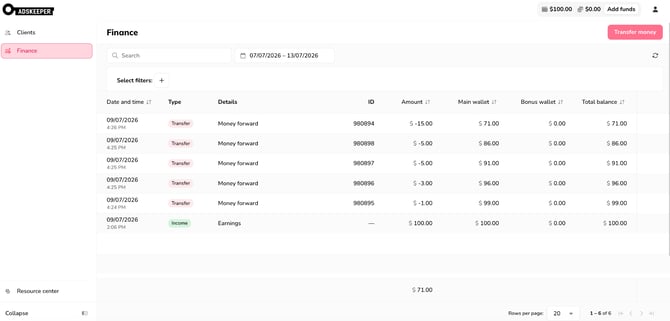
The Finance section includes an agency-level transaction view. Transactions include:
- earnings;
- transfers;
- backward operations;
- wallet balance changes.
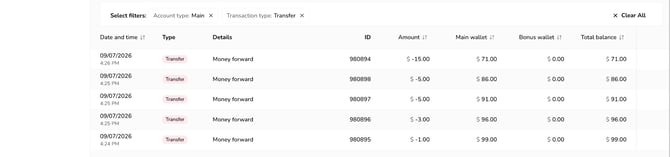
The Finance tab supports the following filters:
|
Filter |
Description |
|
Client ID |
Search by one or multiple Client IDs. Multiple IDs can be entered separated by commas. |
|
Date range |
Select the transaction period. The default period is last week. The maximum period is limited to 1 year. |
|
Account type |
Filter by account type: All, Main, Bonus. |
|
Transaction type |
Filter by transaction type: All, Earnings, Transfer, Backward. |
Filters affect the transaction list and total values.
The Finance table includes the following columns:
|
Column |
Description |
|
Date and time |
Date and time of the transaction. |
|
Type |
Transaction type, such as earnings, transfer, or backward. |
|
Details |
Additional transaction details, such as payment form or operation description. |
|
Client ID |
Client ID related to the transaction, if applicable. |
|
Amount |
Transaction amount in the agency currency. |
|
Main wallet |
Main account balance after the transaction. |
|
Bonus wallet |
Bonus account balance after the transaction. |
|
Total balance |
Total agency balance after the transaction. |
The Finance tab include a Total line for the Amount column. The total is calculated based on the selected filters.
The Finance table supports pagination. Sorting is available for supported columns.
Users can export finance data to CSV. The export follows the selected filters and visible transaction scope.